
Multiple Life Fitness products can facilitate connecting flash memory devices, like USB memory sticks (AKA thumb drives, flash drives, pen drives) or SD cards, for updating software or other means.
The below information indicates what the exact support is per console and flash memory device.
To guarantee correct functionality with our console, ideally a flash drive should be used from a well-known brand, should have the possibility to write-protect the drive. For USB flash drives we also advise to use versions which have a data transfer LED.
USB Memory sticks
USB memory sticks are generally used for updating the software on a Console or other device (Servers, Tuners).
Consoles normally have a front USB port which is accessible without removing any parts or covers.
Tuners normally have a USB port on the Tuner PCB which is accessible through the back of the console. In many cases Tuners can be updated through the console update process though.
| Product | USB Port type | USB Speed Type Support | Max USB Memory Size | Supported File Systems |
|---|---|---|---|---|
| Symbio Console | USB A | USB 2.x/3.x | ? | FAT, FAT32, NTFS |
| Discover SE4 Console | USB A | USB 2.x/3.x | ? | FAT, FAT32, NTFS |
| Discover SE3HD/ SE3/ ST/ 70T Consoles | USB A | USB 2.x/3.x | ? | FAT, FAT32, NTFS |
| SL Console | USB A | USB 2.x/3.x | ? | FAT, FAT32, NTFS |
| X Console | USB A | USB 2.x/3.x | ? | FAT, FAT32, NTFS |
| C/50L Consoles | USB A | USB 2.x/3.x | ? | FAT, FAT32, NTFS |
| TFT 2.0 Console | USB Micro | ? | ? | ? |
| ICG MyRide Server | ? | ? | ? | ? |
| ICG Connect System Server | ? | ? | ? | ? |
| Tuners | USB A | USB 2.x/3.x | ? | ? |
- Note: make sure to purchase from reputable vendors like Amazon's Official Samsung Store or physical stores like Staples, Best Buy, etc. Please avoid 3rd party resellers since drives may be unreliable/counterfeit that will cause issues. Sleek USB flash drives are ideal (image below) as they do not get caught in the console USB drive cover.
SD Cards
SD Cards are mainly used to apply Console recovery software to the console
| Product | SD Port type | Max SD Memory Size | Supported File Systems |
|---|---|---|---|
| Symbio Console | Micro SD | ? | ? |
| Discover SE4 Console | Micro SD | ? | ? |
| Discover SE3HD/ SE3/ ST/ 70T Consoles | SD | ? | ? |
| TFT 2.0 Console | Micro SD | ? | ? |
File Systems
Each flash device (or hard drives for that matter) need to be setup with a file system and partition. This is normally chosen when formatting the flash memory. Our products work with certain File Systems only.
| File System Name | Maximum supported flash memory size | Comments |
|---|---|---|
| FAT (FAT16) | 4GB | - |
| FAT32 | 32GB-8TB^ | - |
| exFAT | none | won't work for any of our products!!!! |
| NTFS | ? | - |
^FAT32 can be used for larger USB flash drives up to 8TB, but as the Windows graphical operating system only supports formatting until 32GB, the majority of users can only format up to this size. If larger flash drives are used, then Windows will automatically format them to 32Gb file system size and partition. Other operating systems (Linux etc.) can support FAT32 up to 8TB.
Hardware Quality and Options
Quality
Please be reminded that the quality of flash memory hardware devices can vary. Some hardware can work intermittent or not at all. It's also possible that hardware can degrade over time.
Make sure to always buy flash memory hardware from known brands (like SanDisk) and not from no-name brands, as this will risk possible issues in combination with our consoles.
Usage
The more a flash drive is used to up and download data, the more it degrades. When the flash drive is not write-protected, then its also possible that an external device, where its attached to, can accidentally manipulate or corrupt files on the flash drive. Try to use write-protected flash drives where possible. If the flash drive doesn't work or doesn't work correctly any more, try to remove and upload the files again, or even format the complete drive again and add the files back onto it afterwards.
LED
Ideally USB memory sticks with a data transfer LED should be used, so that there is a visual identifier which shows that data is being transferred.
Note: some USB stick brands and models indicate they include an LED, but it won't be used to indicate data transfer, but just to blink when connected. Make sure to verify this when buying.

Write Protection
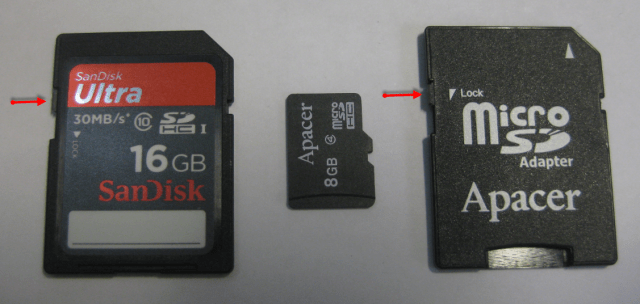
As Android systems (like used in our touch screen consoles) like to write on USB flash memory devices when data transfer is happening, USB drives and SD cards can be used which prevent writing on them. SD Cards normally have that feature included through a built-in mechanical micro switch. USB sticks need to have this specified in their specifications. MicroSD cards don't have this feature (unless used with a SD card adapter.
See the following article for Choosing a USB Flash Drive for Cybex Software Updates